Raspberry Pi 4 B
A colleague raised a question — how does the Pi 4 actually encode? A question asked — an answer must be given. 🙂
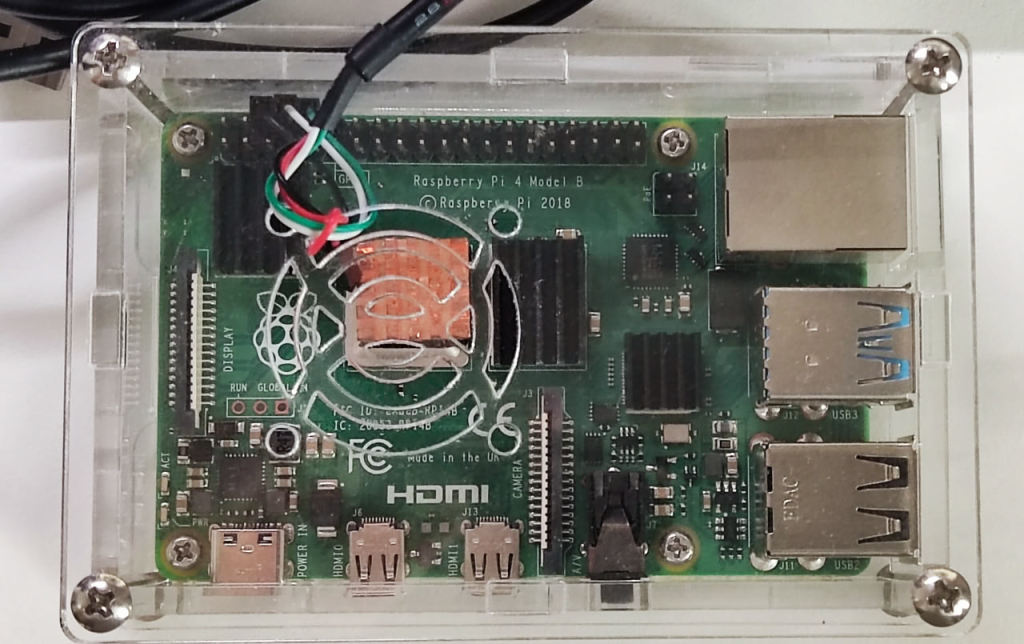
I borrowed one from him for analysis for a while .
Frankly speaking, the processor is quite slow. But that’s not surprise, since enthusiasts don’t require much computing power for their projects while using this board. I was quite surprised to learn that it has hardware support for H.264 encoding – I wasn’t very familiar with the Raspberry line. Although it comes with a limitation: a maximum frame size of 1920×1080 at 30 fps (we’ll definitely check if it’s true).
The next generation Pi 5 (BCM2712) is 74% faster than the Pi 4 (BCM2711) — https://www.cpubenchmark.net/compare/6054vs4297/BCM2712-vs-BCM2711. A natural question arises — how far has video encoding and hardware support progressed since then? And here came the next surprise while discovering they dropped the hardware codec for Pi 5.
Installation went smooth and quick. The firmware was updated, Ubuntu 25.10 Server was installed, and FFMPEG 8.0.1 was compiled with v4l2 support (–enable-v4l2-m2m).
Connecting external fast drives via USB turned out to be a stumbling block. I tried many options, but all drives disconnected under load. I had to settle for just an SDXC card. Btw, the Pi 5 has an expansion board to connect NVMe.
Regarding thermals, the Pi 4 board can operate without additional cooling — it heats up to a maximum of 75°C under 100% CPU load. A fan lowers the temperature to 60°C, which is more than acceptable. However, I can’t advise to push the system to hard load — attempting to compile FFMPEG using all cores (make -j) quickly overloaded it and it became unresponsive.
In encoding-only mode, the processor heats up to a maximum of 50°C. Meanwhile, average CPU load is around 8%.
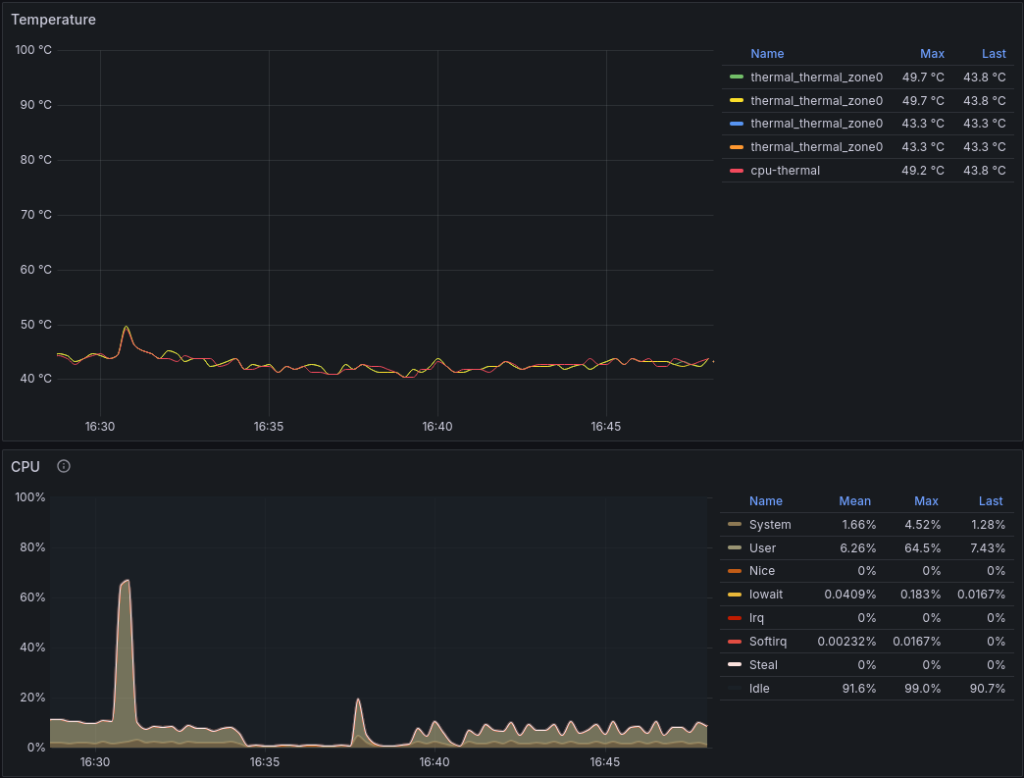
Spike above 60% load – video probing on CPU .
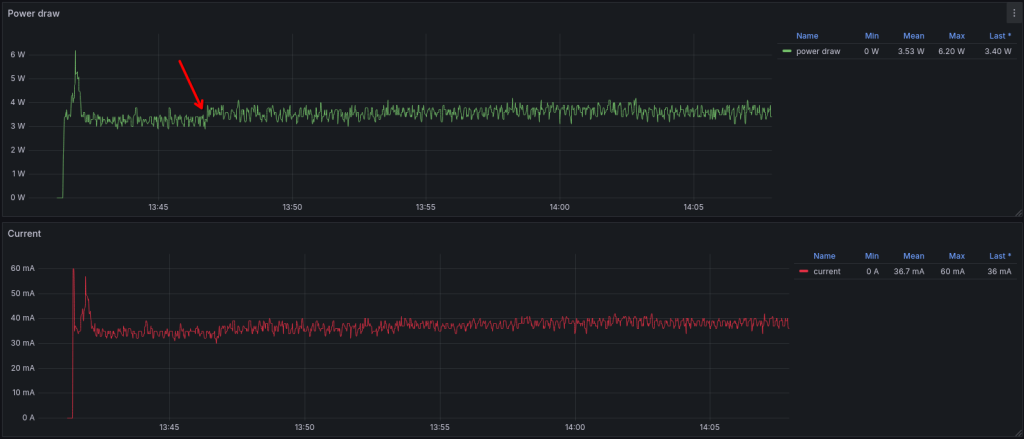
Power consumption. I recorded an average of 3.6W in transcoding mode (both decoder and encoder are utilized). The board consumes 3.3W in idle mode. The arrow marks the start of the test.
I think that’s enough general information. Let’s move on to the encoding results and comparison with other codecs.
Two rounds of tests were conducted. The first was a standard test using raw, uncompressed video in y4m format. I do this deliberately to rule out side effects from decoding. Yes, decoding using any codecs of the same standard must produce a binary-identical output stream. But this isn’t always the case, especially with implementations that aren’t industry-standard.
Which is exactly what is observed in the case of Raspberry Pi 4. The decoder output identity test failed. When decoding the same videos and saving them to a raw stream, the checksums do not match the reference. For verification, the same videos were decoded using an Nvidia GPU.
| Fragment Name | MD5 |
|---|---|
| Raspberry Pi 4 | |
| harmonic_birds_of_prey_1920x1080_30fps_600.y4m | 1001720fe2f8fa52e146f33a65e47a33 |
| harmonic_monkey_pool_1920x1080_30fps_600.y4m | 901856a974f83742be3850a10862c641 |
| harmonic_monkeys_fur_closeup_1920x1080_30fps_600.y4m | c9569b77be1f758d5e3f5e2828a6ecc4 |
| harmonic_waterfall_1920x1080_30fps_600.y4m | 6073e0b5e1eb06b376ddcb3f0ca6b87d |
| FFMPEG SW Decode | |
| harmonic_birds_of_prey_1920x1080_30fps_600.y4m | da84bac5786fbef5afa96a809e266051 |
| harmonic_monkey_pool_1920x1080_30fps_600.y4m | 13e6085858d98525f954263e72358f18 |
| harmonic_monkeys_fur_closeup_1920x1080_30fps_600.y4m | cf722332a4e6f88ffad5233983b4218b |
| harmonic_waterfall_1920x1080_30fps_600.y4m | a6f61c123c58a8306fe78cfebe529070 |
| NVDEC | |
| harmonic_birds_of_prey_1920x1080_30fps_600.y4m | da84bac5786fbef5afa96a809e266051 |
| harmonic_monkey_pool_1920x1080_30fps_600.y4m | 13e6085858d98525f954263e72358f18 |
| harmonic_monkeys_fur_closeup_1920x1080_30fps_600.y4m | cf722332a4e6f88ffad5233983b4218b |
| harmonic_waterfall_1920x1080_30fps_600.y4m | a6f61c123c58a8306fe78cfebe529070 |
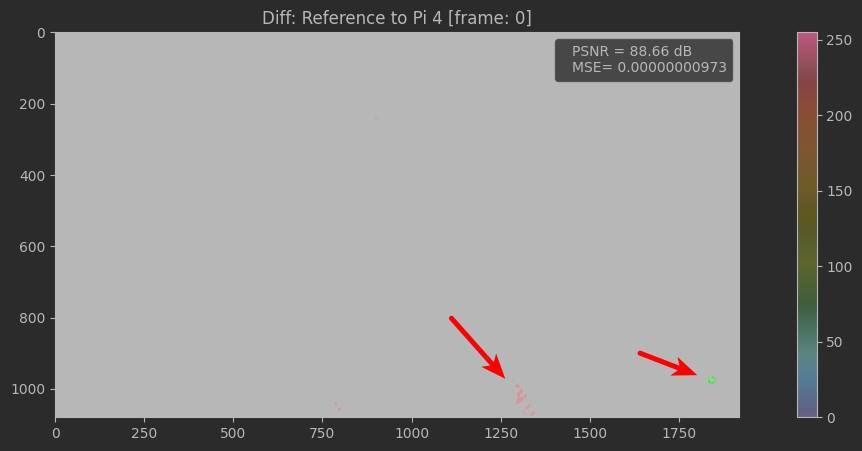
Frame-by-frame analysis showed significant difference areas when comparing to reference frame:
First round is for quality assessment only. The encoding speed is questionable because the data bus can be a bottleneck for an uncompressed stream, and the hardware encoder may not be fully loaded.
Moreover, the encoding speed was relatively far from the manufacturer’s claimed 30 fps for 1080p — around 20 fps.
To determine the real speed, a second round was conducted with a compressed input stream. It surprised by very unstable operation with frequent FFMPEG crashes:
`Assertion pkt failed at fftools/ffmpeg_dec.c:755`
`Aborted (core dumped)`
It was observed across all resolutions and nearly all scenes. For 1080p, the speed of the successfully transcoded sequences occasionally reached 29 fps, but never exceeded it. Each video was run through a warm-up test before transcoding to ensure all data remained in cache before the actual run and the disk subsystem doesn’t interfere with performance.
Several logs contained messages:
`All capture buffers returned to userspace. Increase num_capture_buffers to prevent device deadlock or dropped packets/frames.`
Setting the -num_capture_buffers parameter to 32 and then to 64 didn’t bring the stability. The decoder completely stopped responding halfway through the test – only a board reboot helped. As a result, only 482 out of 720 successfully encoded (67%).
Perhaps, there’s a build of FFMPEG with which the Raspberry codec works with no issue.
libx264
Like Rockchip, comparing the Raspberry with codecs in batch/high quality mode doesn’t make much sense. It also lacks of b-frames. Even with a fast preset, libx264 wins by 33%–37%:
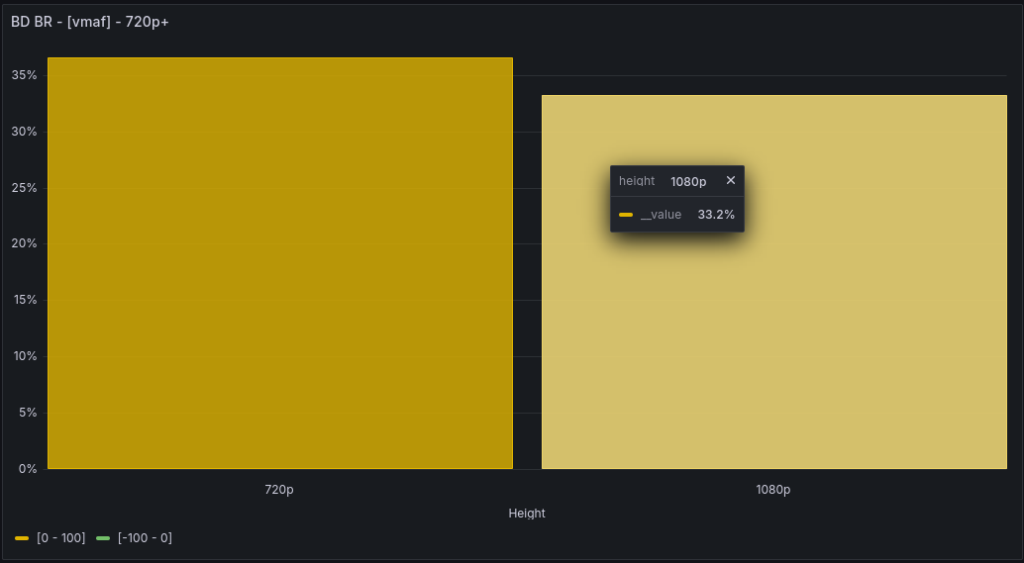
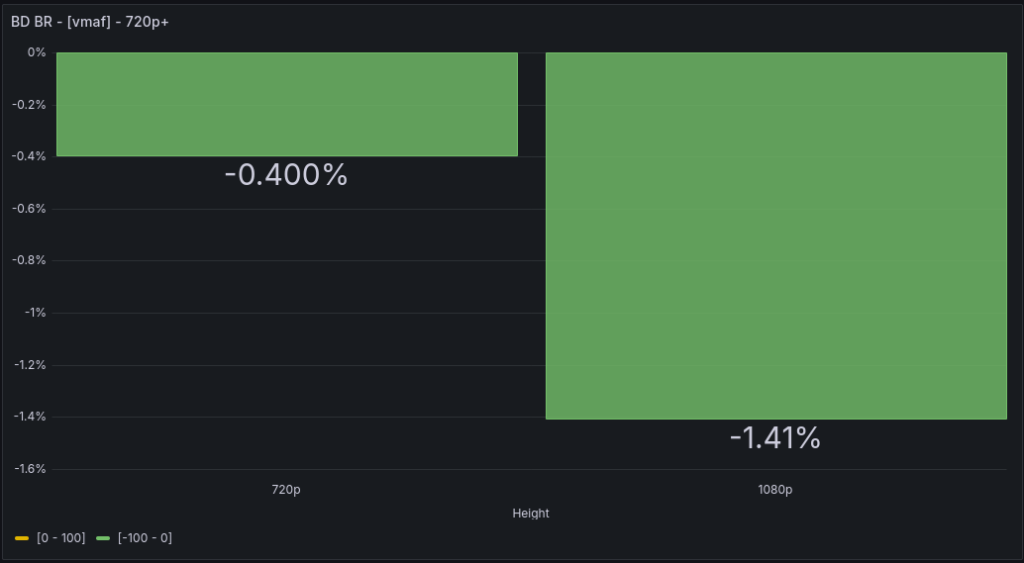
However, when compared to a slow streaming preset, the quality is almost identical:
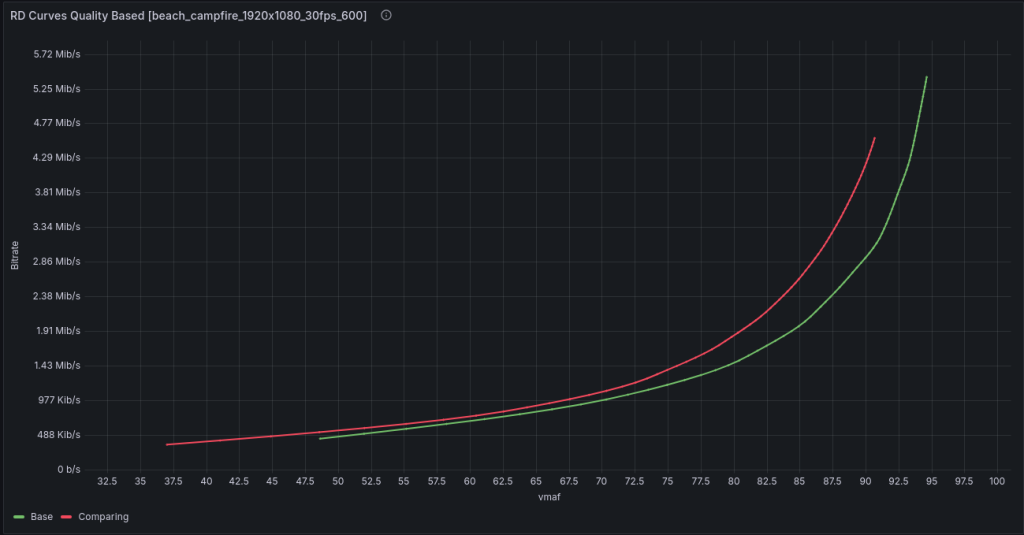
Encoding a static beach campfire scene, the Pi 4 shows better compression at the same quality gaining 25%:
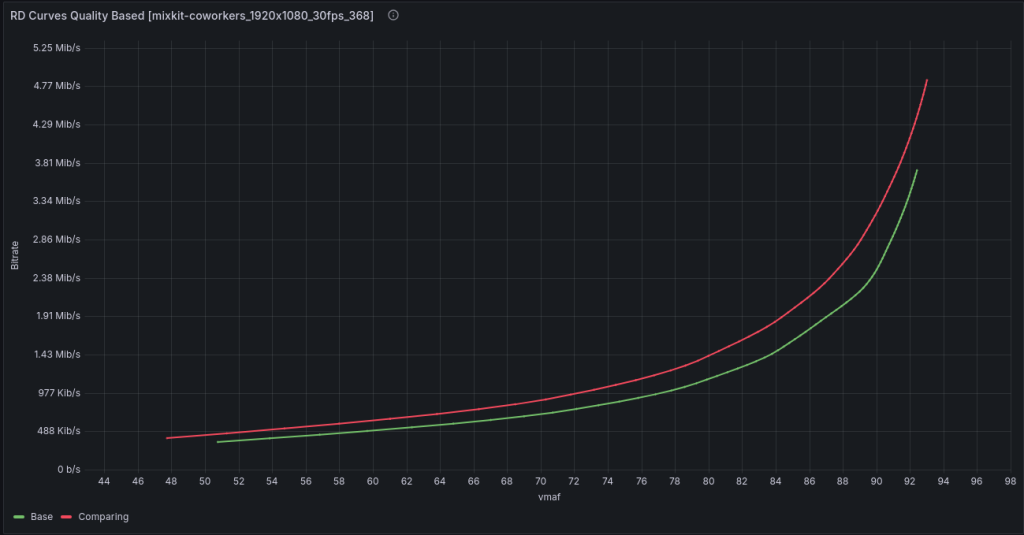
The same pattern appears in a teleconference scene. Here, the bitrate gain is around 25%:
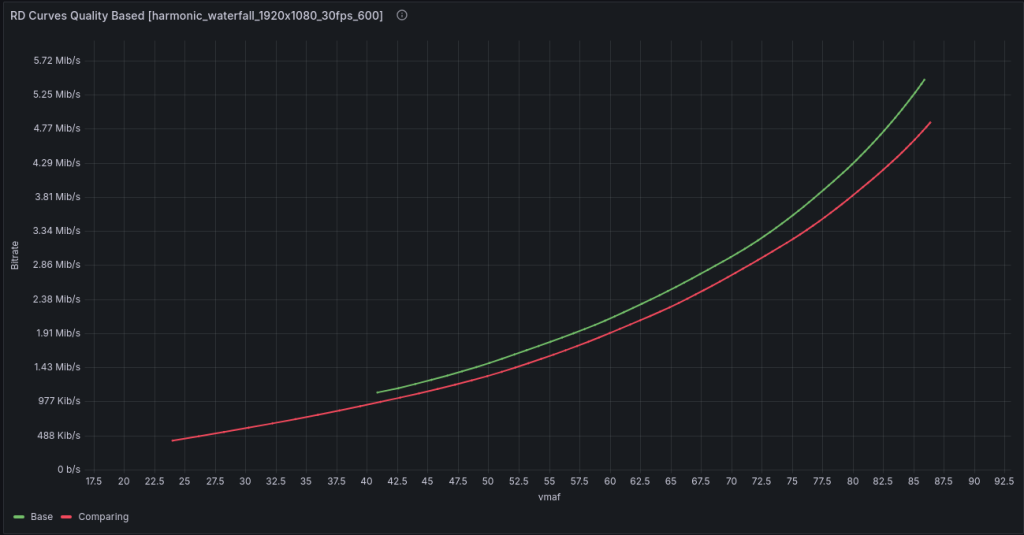
But on a waterfall scene, it loses 10%. The codec doesn’t handle scenes with lots of motion well.
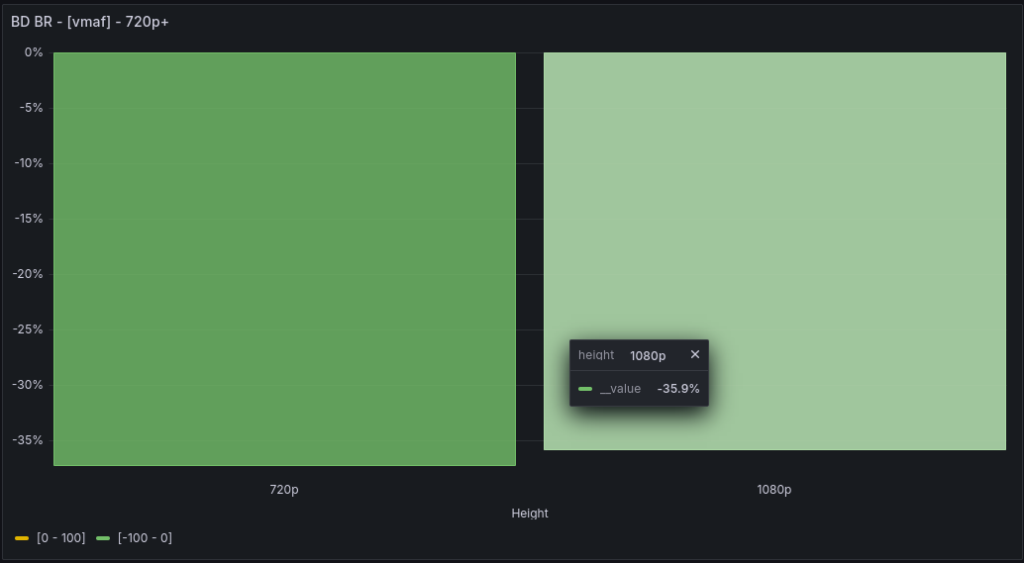
When compared to the veryfast preset, the bitrate gain is up to 37% (at 720p)!
NVENC
Comparison charts of Raspberry Pi 4 and NVENC H.264
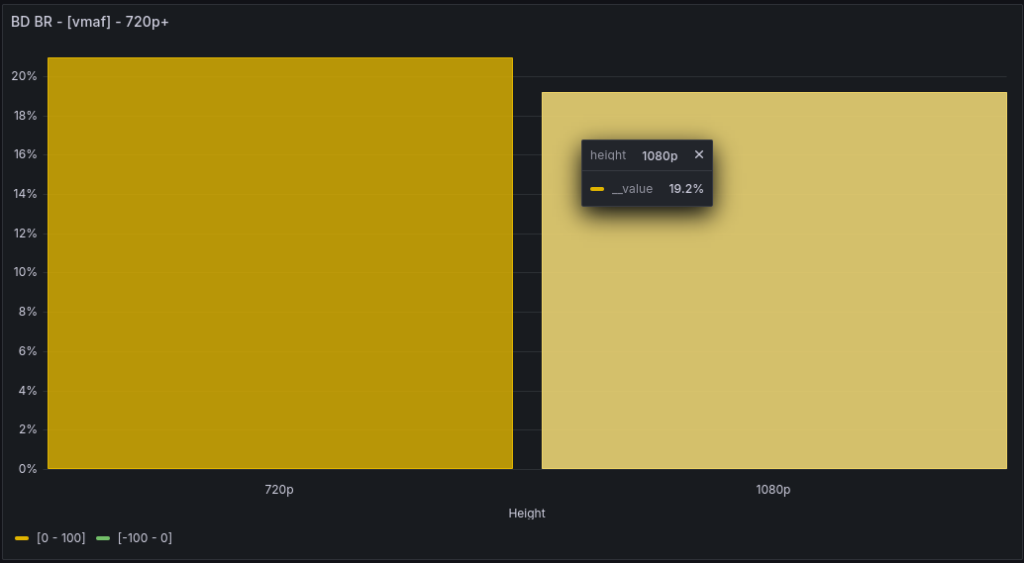
It’s harder to compete with NVENC’s streaming mode. NVENC compresses streams better regardless of scene type.
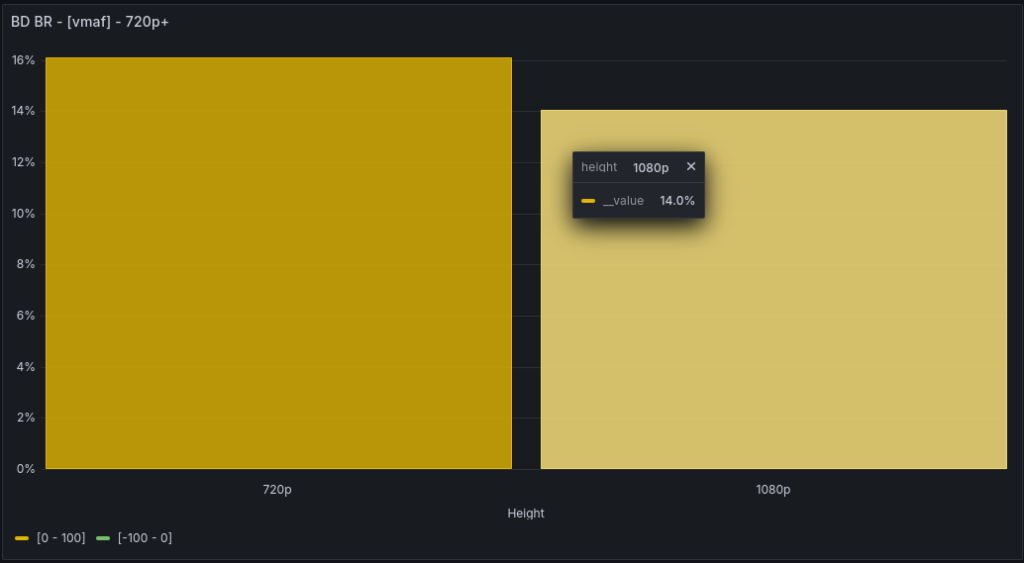
Loss of up to 16% on the fastest preset p1. And up to 21% on the highest quality preset p7:
QSV
There is no surprises. A loss of around 30% when compared to veryslow (a mode with b-frames):
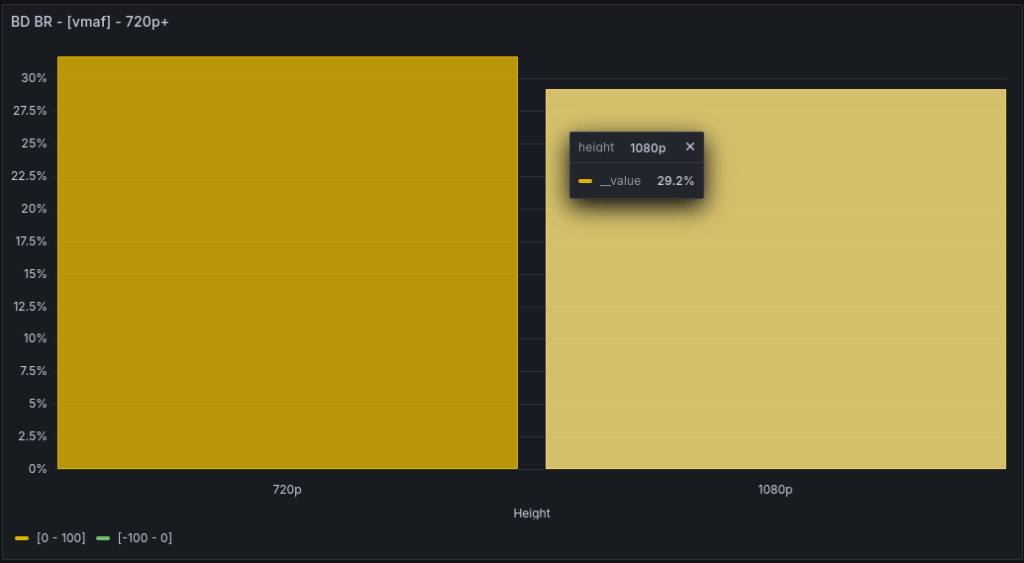
Comparison with streaming mode will be added later.
RKMPP
Comparison charts of Raspberry Pi 4 and Orange Pi 5 Plus
The expected win is clear, considering good performance against other codecs and weak H.264 RKMPP implementation. At 1080p, there’s a 17% bitrate saving:
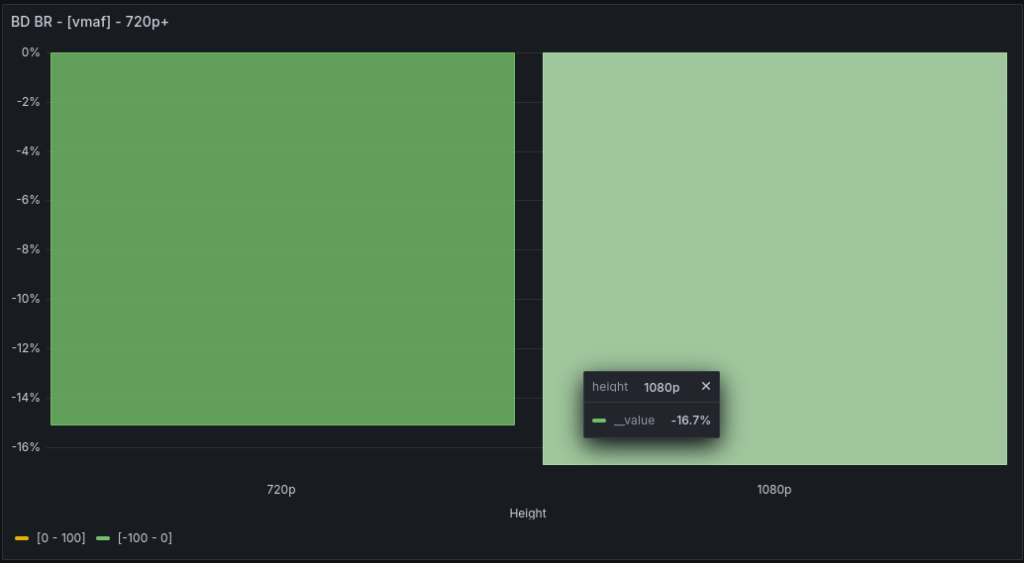
Both boards perform similarly for rate control. When bitrate is insufficient for complex scenes, both overshoot by more than double. The Pi 4 overshoots by 2.45x.

On static scenes, the Pi 4’s bitrate control is nearly ideal, with a perfect 1x across the entire bitrate range:

Conclusions
The encoding quality of the Raspberry Pi 4 was a pleasant surprise — the implementation is impressive for such budget hardware.
The fly in the ointment was the unstable decoder performance, which makes the board’s use in continuous transcoding questionable. Hope this issue doesn’t occur in certain builds.
Regarding encoding speed. I did not see the manufacturer’s claimed 30 fps for 1080p. On average, this figure falls short of 20 fps. For 720p, encoding speed is around 52 fps.
As always, here’s the link to the database where you can compare everything with everything — https://www.vmetrix.tech:3000/d/ads7nhh/bd-br-aggregated
I’d like to advertise the VMAF calculations now uses the VMAF NEG model too. I’m going to post details about it separately. For now, here’s a link to a relevant arXiv article — https://arxiv.org/pdf/2107.04510.
