Evaluating Intel A380 QSV Encoding
Let’s examine how Intel encodes on modern graphics cards.
My previous experience was entirely unimpressive, starting from building the source code and preparing for encoding in general. An embarrassingly large amount of time was spent on what seemed like a simple task. We even had to involve system programmers just to even get MFX working.
A recent test with the N100 platform showed a slightly better picture. Getting QSV working with FFMPEG build and encode adequately failed (the inadequacy was in uncontrollable bitrate). However, the encoding utility from the SDK delivered stable results. And I managed to evaluate the H.264 video compression quality.
The current situation with a discrete card and new code pleasantly surprised me twice and once “did not disappoint” (in quotes, because I still couldn’t get the HEVC codec to run). So, let’s look at the pleasant part, H.264 and AV1.
Before moving to the charts, I want to note the set of test videos differs from what the graphic card manufacturers use. It’s done deliberately to show how the codecs perform under certain conditions, on “difficult” scenes. In the companies’ promotional materials, you may likely find a greater spread in quality when comparing to competitors.
You can find the exact test fragments chosen here: https://www.vmetrix.tech/methodology/. Encode parameters here: https://www.vmetrix.tech/encode-parameters/.
Aggregated BDBR metrics: https://vmetrix.tech:3000/d/ads7nhh/bd-br-aggregated
RD Curves: https://vmetrix.tech:3000/d/adrgpg7/rd-curves
H.264
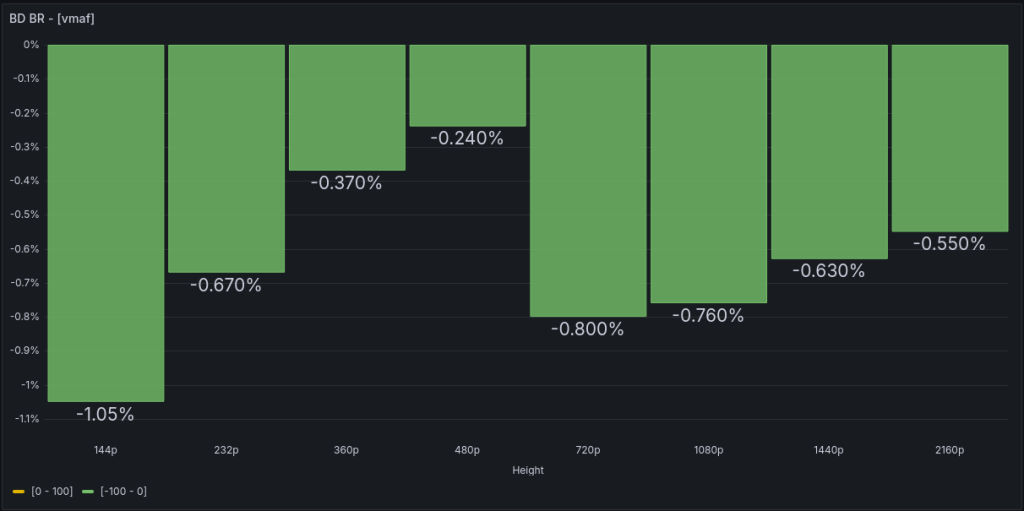
Comparison with itself. I’ll use average BDBR VMAF values across all videos (reminder: negative BDBR is good, positive is bad).
Presets veryslow vs veryfast. Yes, there is a gain. At best, about 1% bitrate savings – for the smallest 144p videos. For others, the difference is even smaller.
Don’t try to encode at low bitrates since the codec will ramp it up anyway. Usual pattern is shown in the next chart. For a target bitrate of 461K for 1080p, the output was 1.5 times higher.
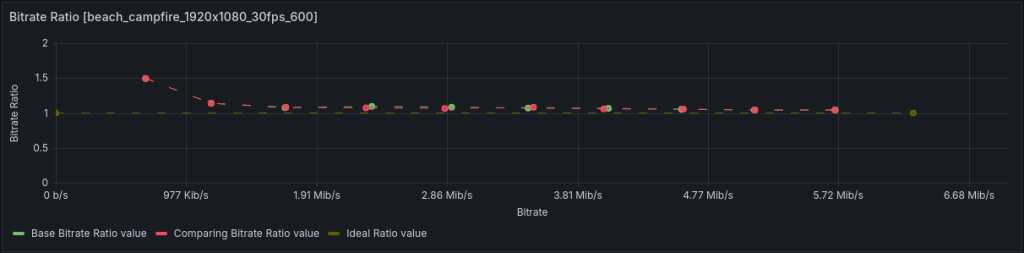
Although this pattern appears with almost all hardware codecs.
Let’s compare with the “reference,” libx264, preset slow.
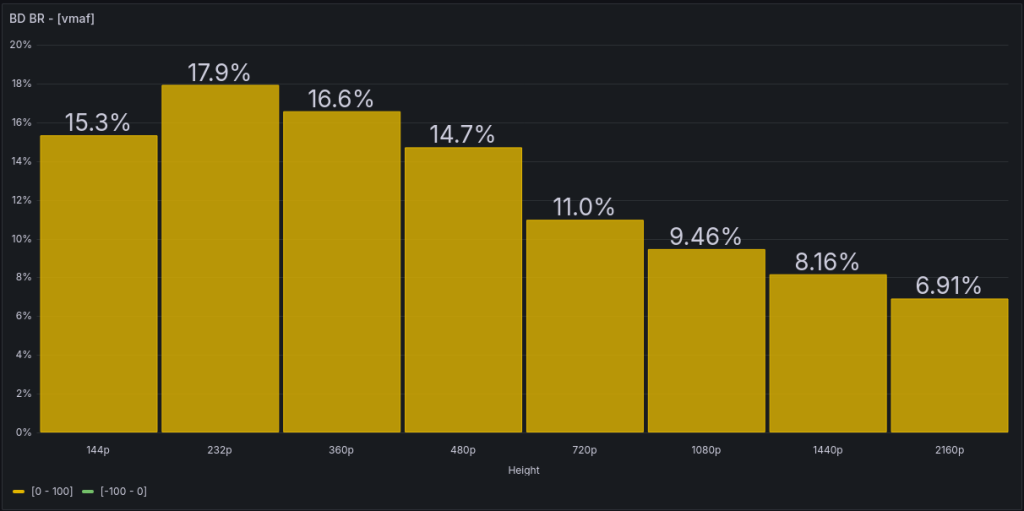
Basically, nothing unexpected. A bitrate deficit within 7% – 11% for main frame sizes. Which is not bad overall.
What about NVENC?
The veryslow preset is slightly worse than H.264 NVENC p4, i.e., around 2% – 5% for main frame sizes. However, for 4K there is even a small gain.
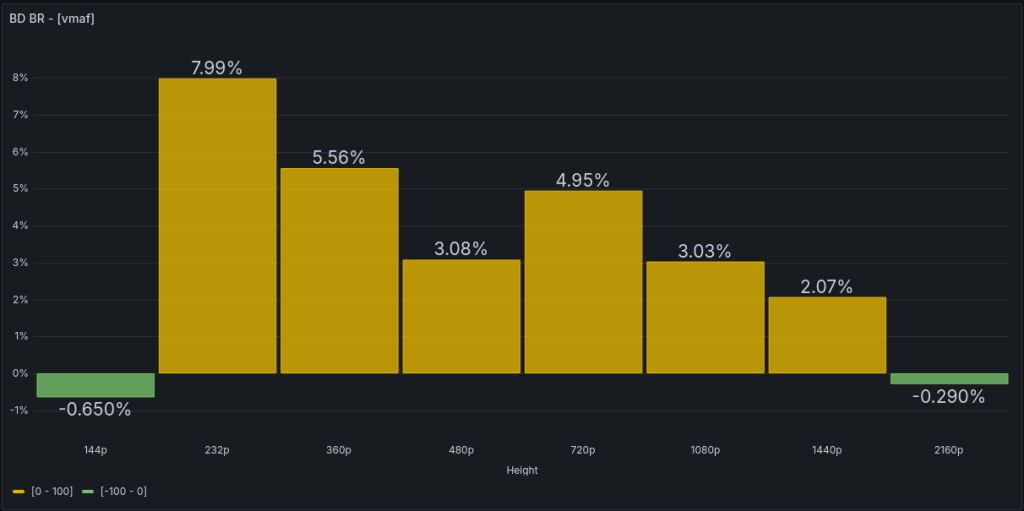
The gain would be around 22% – 25% comparing to the fastest preset.
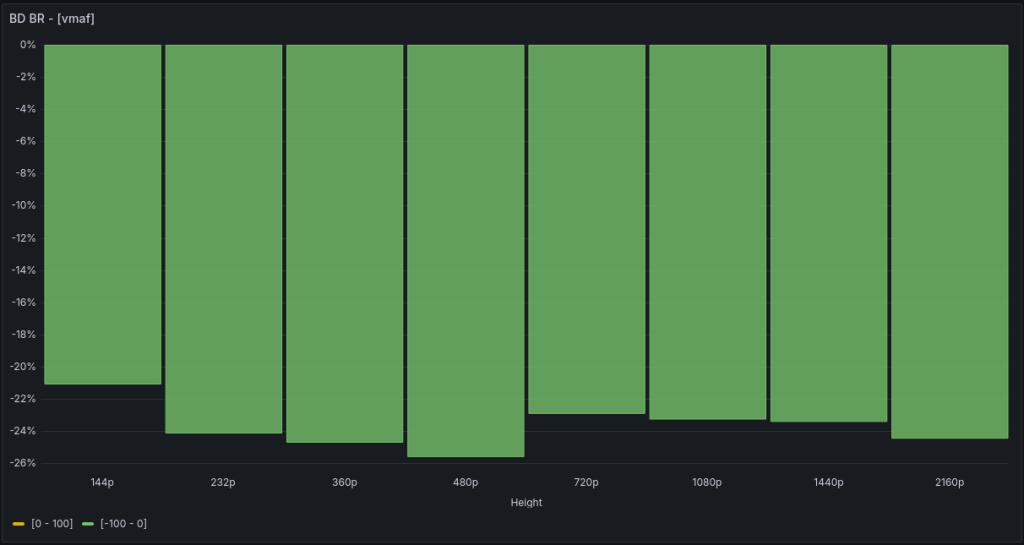
Compared to the highest quality p7 – a deficit of up to 10%. But for “common” frame sizes, up to 7%. Which is not bad overall.
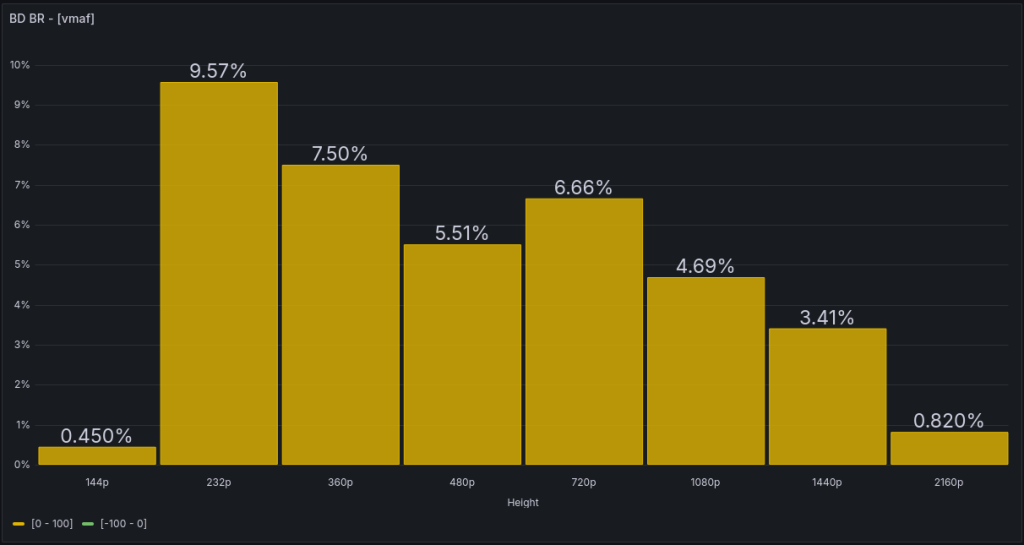
AV1
First, let’s see how much better it is than its own H.264 implementation.
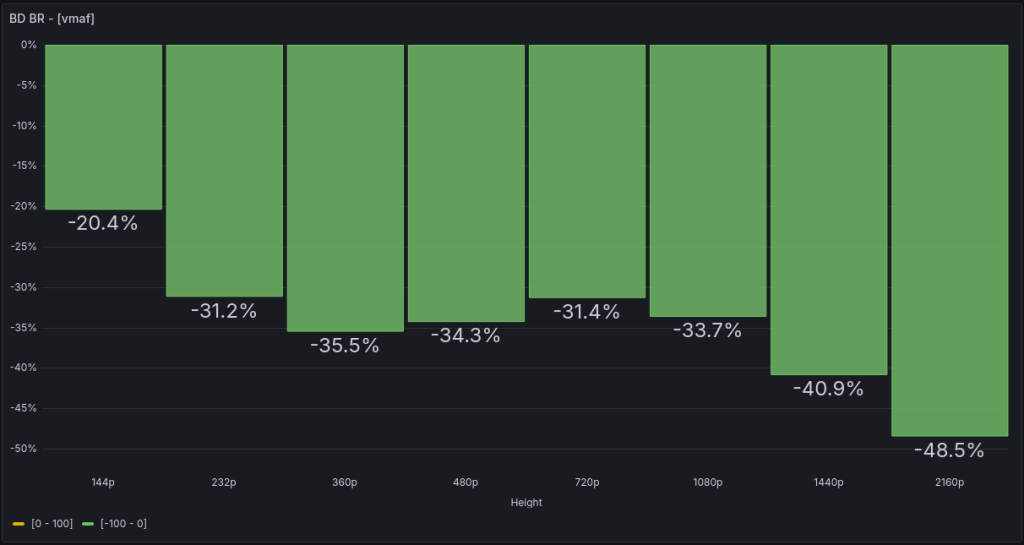
And here are the promised 50% savings – but only for 4K. The biggest gain, an impressive 83%, you’ll get on such a “heavy” scene with many moving objects.
And what about NVENC?
I’d to clarify the results were obtained using NVENC 9th gen, i.e., NVidia Blackwell GPU. The 8th gen (Ada) seems slightly worse. I’ll examine the difference in the future.
Comparing best quality presets, QSV will need about 9% – 13% more bitrate to support the same quality as NVENC.
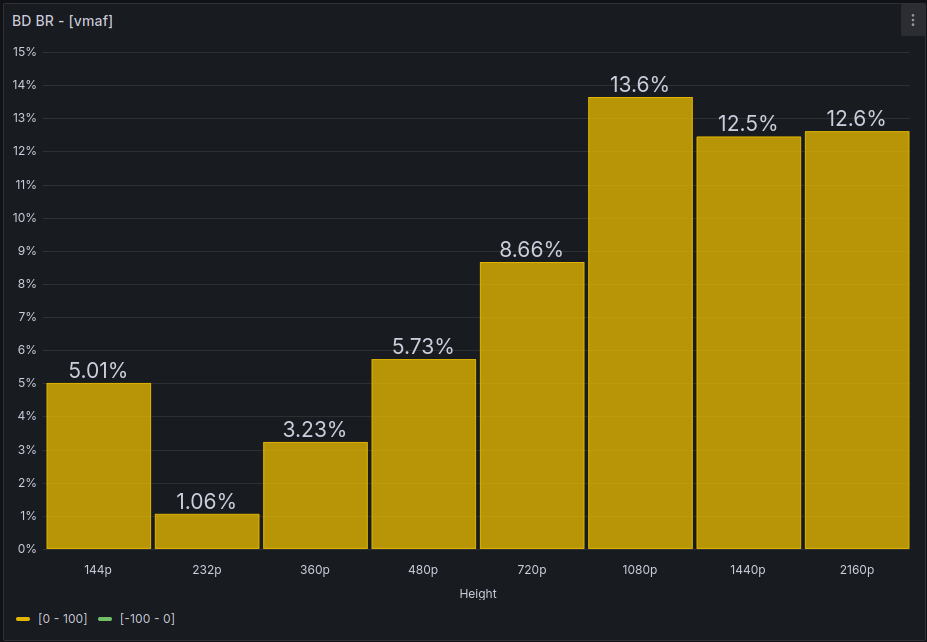
LibAOM
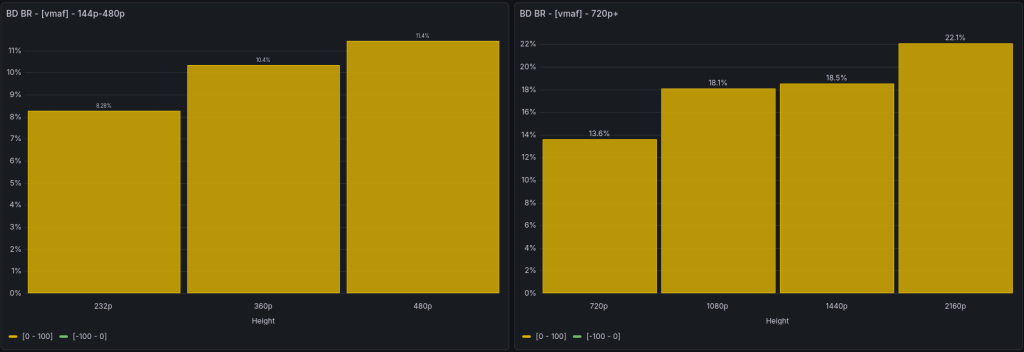
QSV loses 13% — 22% in main frame sizes comparing to the “fast” preset 8 of libaom-av1:
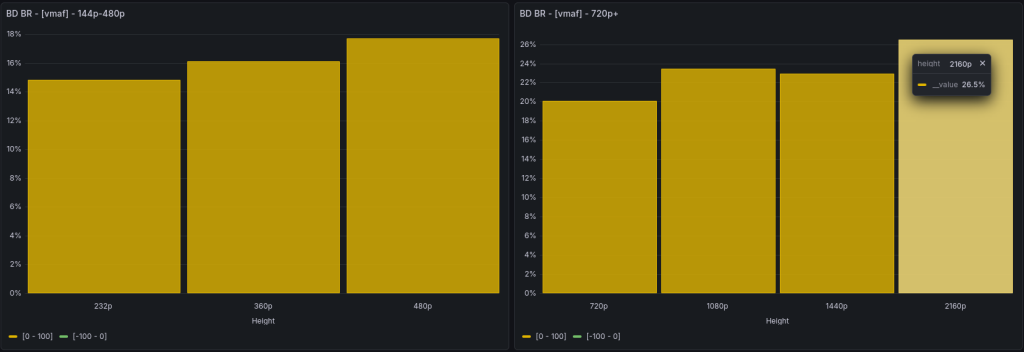
When compared to the slower and higher quality preset 4, QSV loses slightly more — from 20% to 26%:
It’s worth to note the QSV AV1’s biggest difficulties with bitrate control appear in the scene from the animated film Sol Levante:
and the waterfall scene:
In the animated film scene, 4K 3 Mbit/s is the limit for QSV, below which it significantly overshoots the bitrate — by more than 2 times. Across the entire bitrate range, an overshoot of about 15% is observed. LibAOM, meanwhile, maintains a ratio close to 1 starting from 2.3 Mbit/s:

On the waterfall, the overshoot is even greater — about 30% across the entire range and 2.3x at the lowest bitrate. For the software encoder, the ratio of required bitrate to actual is close to 1 (undershoot within 1%) starting from 2.3 Mbit/s:

SVT-AV1
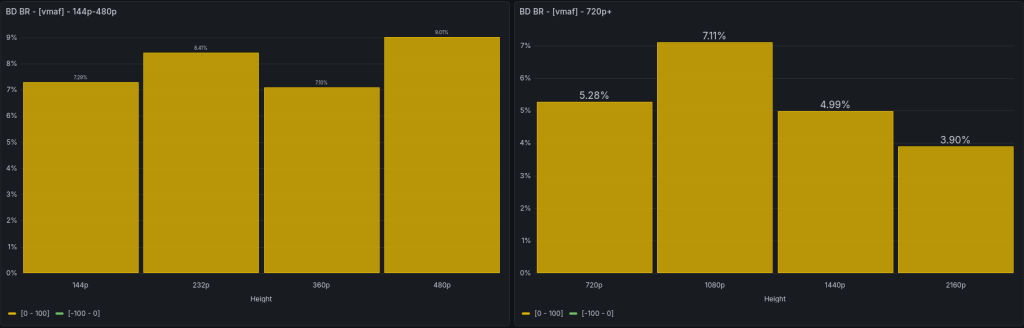
When compared to the faster preset 7, the QSV AV1 encoder has a smaller gap than with libaom. That is, from 4% to 7% on main frame sizes:
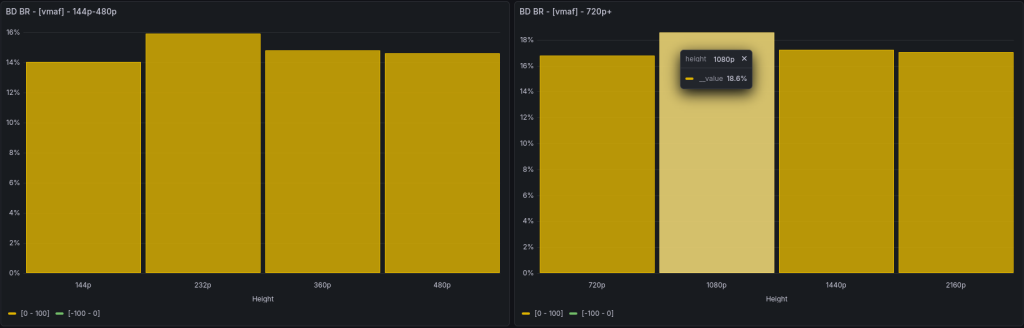
And with preset 3, the gap is larger — around 17% — 18%:
In terms of bitrate control, SVT-AV1 performs slightly worse at low bitrates, overshooting by as much as 3 times in the waterfall scene. However, starting from 3.7 Mbit/s for 4K, the bitrate overshoot is within 7% (for QSV — 30%):

RKMPP
And the final chord – a comparison with H.264 RK3588 (don’t blame them, there’s no b-frames), sorry…
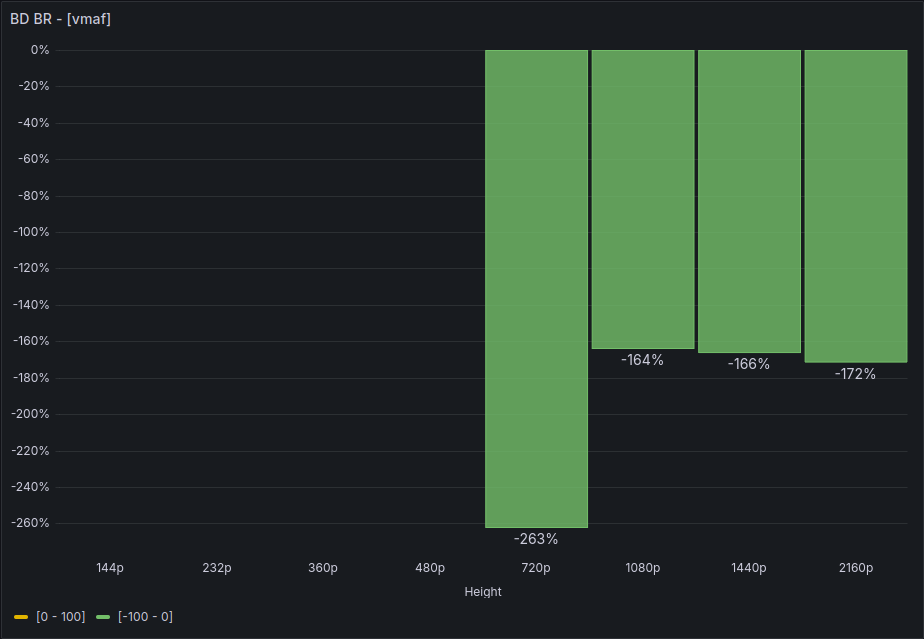
What’s left out the box – is a comparison of encoding speed and power consumption. I hope to add it soon…
